
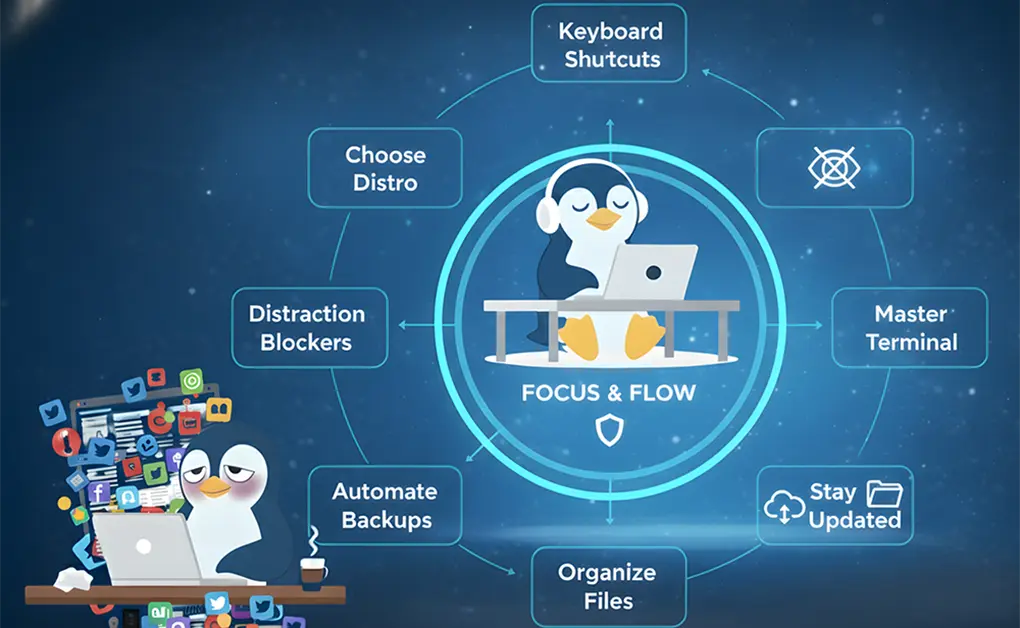
The biggest Linux workflow mistakes that waste time include choosing the wrong distro, treating Linux like Windows, over-customizing setups, avoiding the terminal, mixing software sources, skipping updates, using root for daily tasks, neglecting backups, running unsafe commands, ignoring security basics, failing to use community resources, and letting distractions disrupt focused work.
Key Takeaways
- Choose tools that support your workflow: Picking the right Linux distribution and desktop environment prevents unnecessary friction and keeps your system stable and productive.
- Work with Linux, not against it: Adapting Linux-native workflows, apps, and terminal habits helps you use the system more efficiently instead of fighting Windows-like expectations.
- Keep your system clean, updated, and consistent: Avoiding risky customizations, mixing package sources, or ignoring updates ensures a smoother experience with fewer interruptions.
- Protect your focus and your data: Backups, cybersecurity habits, community support, and tools like DigitalZen help maintain a distraction-free, reliable environment so you can stay on track.
Mistake #1: Choosing a Linux Distribution That Works Against Your Productivity
Picking a distro that doesn’t align with your workflow can slow you down, limit software availability, and introduce system friction that disrupts your focus. The right distro should support your daily tasks without adding unnecessary troubleshooting.
Why This Hurts Productivity
- You waste time on Linux maintenance instead of using it as a tool
- Poor repository support
- Hardware compatibility issues
- Frequent breakage on unstable or rolling-release systems
How to Fix It
- Choose stable, well-supported distros (Ubuntu, Fedora, Linux Mint)
- Select a desktop environment that fits how you prefer to work
- Test distros via live USB or virtual machine before committing
Mistake #2: Letting Digital Distractions Undermine Your Linux Workflow
Even with the best Linux productivity apps or tools, it’s impossible to maintain focus when attention constantly shifts. Social media, notifications, and endless tinkering can derail your focus and prevent you from reaching the full potential of Linux.
This is especially true for students trying to study, gamers balancing play with other responsibilities, or digital nomads working from distracting environments like cafés and co-working spaces.
Why This Hurts Productivity
- Lost focus due to websites and apps
- Frequent context switching
- Tinkering replaces actual work
How to Fix It
- Use DigitalZen’s Linux-supported Focus Mode
- Block distracting websites and apps
- Create scheduled focus sessions and daily limits
Mistake #3: Treating Linux Like Windows Instead of Adapting Your Workflow
Trying to force a Microsoft Windows mindset into a Linux environment creates constant friction. Linux distributions are designed around flexibility, efficiency, and command-line power, so relying on one-to-one app replacements prevents you from using the system effectively.
Why This Hurts Productivity
- Fighting with the system, trying to find apps and UI to work “like” Windows
- Ignoring Linux-native workflows
- Friction caused by mismatched expectations
How to Fix It
- Think in terms of objectives, not brand-specific software
- Explore Linux-native alternatives (LibreOffice, OnlyOffice, GIMP)
- Use workspaces, keyboard shortcuts, and Linux file management effectively
Mistake #4: Over-Customizing Your System Until Stability Breaks
Linux gives you tremendous freedom, from themes and icons to custom shells and tiling window managers. However, taking customization too far, especially early on, often leads to instability and distraction. Instead of enhancing productivity, an overly complex setup can become a maintenance burden.
Why This Hurts Productivity
- System instability or crashes
- Performance slowdowns
- Endless adjustments take time away from meaningful work
How to Fix It
- Customize gradually and intentionally
- Avoid risky system-level modifications
- Keep your setup lightweight and functional
Mistake #5: Avoiding the Terminal and Relying Only on GUI Tools
Skipping the terminal means missing out on efficient workflows and tools that can significantly enhance the way you work. The terminal is a powerful tool that helps Linux users automate tasks, move through the environment faster, and manage their system with fewer keystrokes.
Why This Hurts Productivity
- Slower navigation
- Limited automation
- More difficult system management
How to Fix It
- Learn essential commands (ls, cd, cp, mv, apt/dnf, grep)
- Create aliases and simple scripts that can save you a lot of time
- Combine terminal and GUI for a balanced workflow
Mistake #6: Mixing Software Sources and Causing Dependency Conflicts
Installing packages from random PPAs or mixing formats like DEB, Flatpak, Snap, and AppImage without a strategy often leads to incompatibilities. These issues interrupt focus, slow down troubleshooting, and make it harder to install software reliably.
Why This Hurts Productivity
- Dependency issues
- Update failures
- Application instability
How to Fix It
- Stick to official distro repositories
- Use Flatpak or Snap intentionally, not randomly
- Avoid unmaintained third-party PPAs
Mistake #7: Ignoring Updates and Running Outdated, Buggy Software
Delaying updates exposes your system to vulnerabilities and unresolved issues that affect performance. Regular updates keep Linux distributions secure, stable, and optimized so you can work with fewer interruptions.
Why This Hurts Productivity
- Security risks
- Performance issues
- Missing crucial improvements
How to Fix It
- Update your system weekly
- Enable unattended upgrades when appropriate
- Reboot after kernel or major package updates
Mistake #8: Using the Root Account for Daily Tasks
Running everyday tasks as root increases the risk of catastrophic mistakes. The root account has unrestricted control, so one incorrect command can affect the entire operating system and create hours of unexpected downtime.
Why This Hurts Productivity
- Higher chance of system corruption
- Irrecoverable file loss
- Increased downtime
How to Fix It
- Use a standard user account daily
- Run administrative tasks using sudo
- Limit root access
Mistake #9: Not Backing Up Your Data or System Configurations
Many Linux workflows rely on custom dotfiles, installed packages, and personalized scripts. Without backups, losing your configuration means rebuilding your environment from scratch. This interrupts focus and prevents consistency across machines.
Why This Hurts Productivity
- Lost data after crashes
- Broken systems require long recovery times
- Lost configurations disrupt workflow
How to Fix It
- Use Timeshift, rsync, or Déjà Dup
- Back up dotfiles and package lists
- Automate regular backups
Mistake #10: Copying Random Terminal Commands Without Understanding Them
Running unfamiliar commands from blogs, forums, or outdated guides can break your system. Linux is powerful, but commands like rm, chmod, and systemctl require attention. When users run scripts without reviewing them, troubleshooting becomes difficult and time-consuming.
Why This Hurts Productivity
- System breakage
- Hard-to-troubleshoot issues
- Time wasted repairing preventable problems
How to Fix It
- Verify commands from reputable sources
- Check dates and distro compatibility
- Ask community forums before running unfamiliar commands
Mistake #11: Underestimating Cybersecurity on Linux
Linux is secure, but not invincible. Browser-based threats, malicious scripts, and phishing attempts can affect all operating systems, including Linux. Treating the system as immune increases risk and creates preventable disruptions.
Why This Hurts Productivity
- Ransomware or malware causes downtime
- Data loss or compromised accounts
- Browser exploits disrupt work
How to Fix It
- Scan downloads for viruses
- Use firewalls and regular updates
- Practice safe browsing habits
Mistake #12: Not Asking the Linux Community for Help (Or Asking the Wrong Way)
Linux has one of the strongest communities online, and knowing how to navigate it can significantly enhance your productivity. Many users struggle because they do not provide enough detail, do not search first, or do not follow basic etiquette, which slows down the support process.
Why This Hurts Productivity
- Slow troubleshooting
- Unanswered questions
- Wasted time on avoidable problems
How to Fix It
- Provide logs, system details, and exact errors
- Search before posting
- Follow forum etiquette
How to Build a Productive, Stable Linux Workflow That Actually Lasts

A stable and efficient Linux workflow comes from intentional habits, smart tooling, and a focused environment that supports your goals. When you design your setup with consistency in mind, Linux becomes an operating system that grows with you over time instead of holding you back.
Why This Matters
Building a productive Linux workflow is important because stable habits and proven Linux productivity tips maximize the system’s strengths and reduce friction in daily tasks.
This consistency is especially valuable if you are a student juggling coursework and deadlines or a digital nomad working from cafés, libraries, or shared spaces, where distractions and changing environments are common. A reliable setup helps you maintain a distraction-free environment so you can stay focused and productive no matter where or how you work.
How to Implement It
Start by choosing the right distro and desktop environment for your workflow, so your system naturally supports your workflow. Use workspaces and tiling effectively to keep your tasks organized and reduce context switching. Automate repetitive tasks using scripts or tools like cron to streamline routine actions and save time.
Finally, keep your environment stable and distraction-free with DigitalZen so you can stay focused and maintain a smooth, reliable setup every day.
Conclusion: Linux Becomes a Productivity Powerhouse When You Avoid These Mistakes

Linux already gives you flexibility, control, and efficient workflows, but its true power shows when you use it with intention. Choosing the right distro, keeping your system stable, and building productive habits removes friction so you can focus on meaningful work instead of constant fixes.
A stable setup is only one part of staying productive. The other part is protecting your attention. Even on Linux, websites, apps, and endless tinkering can pull you off track. This is where DigitalZen fits naturally into a long-term workflow. With Linux-supported Focus Mode, scheduled sessions, and distraction blocking, DigitalZen helps you maintain the environment you worked hard to build.
By avoiding common mistakes and supporting your routine with the right tools, Linux becomes more than an operating system. It becomes a reliable partner that helps you stay focused, organized, and consistently moving toward your goals.
Frequently Asked Questions
What Are the Most Common Mistakes New Linux Users Make That Hurt Productivity?
Many new users lose productivity by repeating the mistakes new Linux users make, such as choosing the wrong distro, avoiding the terminal, over-customizing, mixing package sources, and skipping updates. These issues create instability and unnecessary troubleshooting, but learning core Linux habits prevents most problems
Why Do Some Users Find Using Linux Different When Maintaining Productivity?
Some users find using Linux different from other OS platforms because tasks like installing software, navigating the file system, and managing windows follow a new workflow. Once users adapt to Linux-native features, they often find it easier to stay organized and efficient.
Do I Need To Use the Terminal To Be More Productive, or Are Graphical Tools Enough?
You do not always need to use the terminal, but using the terminal for key tasks often improves speed and efficiency. GUI tools are helpful for everyday work, and combining them with terminal commands creates a balanced and highly productive setup that feels both powerful and graphical where needed.
What Tools Are Available for Linux Users Who Want an Easier and More Focused Workflow?
Many tools are available for Linux, including tiling managers, automation utilities, and distraction blockers that help you block social media on Linux and stay focused. DigitalZen is especially helpful for focus because it supports Linux and offers website and app blocking, with flexible session controls, to create a more focused workflow.
How Can New Linux Users Become More Comfortable While Avoiding Productivity Challenges?
New users can become more comfortable by starting with a simple setup, learning core commands, and avoiding heavy customization until they build confidence. Most users encounter challenges when adjusting to new tools, but choosing reliable distros, backing up settings, and using focus tools like DigitalZen help build a smooth, productive routine.
References: