

FocusMe vs Cold Turkey compares two productivity apps designed to block distracting websites and applications. Cold Turkey emphasizes strict enforcement and hard-to-bypass locks, while FocusMe focuses on flexible time limits and habit-building tools. The better choice depends on whether you want stronger blocking or gradual moderation of digital distractions.
Key Takeaways
- FocusMe offers more flexible blocking options than Cold Turkey: Time limiters, launch limits, and partial site blocking let you ration access rather than block completely, which supports gradual habit-building.
- Cold Turkey provides stricter bypass prevention: Features like task manager blocking, system time protection, and Frozen Turkey make Cold Turkey significantly harder to circumvent during active sessions.
- FocusMe supports Linux and Android while Cold Turkey does not: FocusMe works on Windows, Mac, Linux, and Android. Cold Turkey only supports Windows and Mac.
- Cold Turkey uses one-time pricing while FocusMe requires a subscription: Cold Turkey Pro costs $45 once. FocusMe charges ongoing subscription fees, though it offers a 60-day money-back guarantee.
- Both apps have strong lock mechanisms but different philosophies: Cold Turkey emphasizes strict lockdown that’s nearly impossible to bypass. FocusMe emphasizes flexible controls that help you build discipline over time.
What Is FocusMe?
FocusMe is a website and app blocker for Windows, Mac, Linux, and Android. It’s designed around customization and gradual habit-building, offering features like time limiters (set hours per day/week/month for specific sites), launch limiters (control how often you can open a site), and activity tracking. FocusMe uses subscription pricing with a 60-day money-back guarantee.
What Is Cold Turkey?
Cold Turkey is a website and app blocker for Windows and macOS. It’s designed for strict enforcement and bypass resistance, offering features like Frozen Turkey (locks you out of your computer entirely), task manager blocking, and random text locks up to 999 characters. Cold Turkey Pro costs $45 as a one-time purchase.
Users often compare it with Freedom, another popular blocker, and the Cold Turkey vs Freedom debate centers on similar trade-offs between enforcement and flexibility.
Feature Comparison Table
| Feature | FocusMe | Cold Turkey |
| Windows/Mac Support | Yes | Yes |
| Linux Support | Yes | No |
| Android Support | Yes | No |
| iOS Support | No | No |
| Website Blocking | Yes | Yes |
| App Blocking | Yes | Yes |
| Block Entire Internet | Yes | Yes |
| Allowlist Mode | Yes | Yes |
| Time Limiters | Yes (hours per day/week/month) | Limited (allowances only) |
| Launch Limiters | Yes | No |
| Partial Site Blocking | Yes (e.g., block Facebook, allow Messenger) | Yes (via exceptions) |
| Scheduling | Yes | Yes (visual drag-and-drop) |
| Pomodoro Timer | Yes | Yes |
| Random Text Lock | Up to 2,000 characters | Up to 999 characters |
| Password Lock | Yes | Yes (Pro) |
| Block Task Manager | No | Yes |
| Block System Time Changes | No | Yes |
| Uninstall Protection | Yes | Yes (during locked blocks) |
| Activity Tracking | Yes | Yes |
| Frozen Turkey (Computer lockout) | No | Yes |
| Pricing | Subscription | $45 one-time (Pro) |
| Free Version | 14-30 day trial | Yes (limited features) |
Blocking Flexibility and Customization Depth
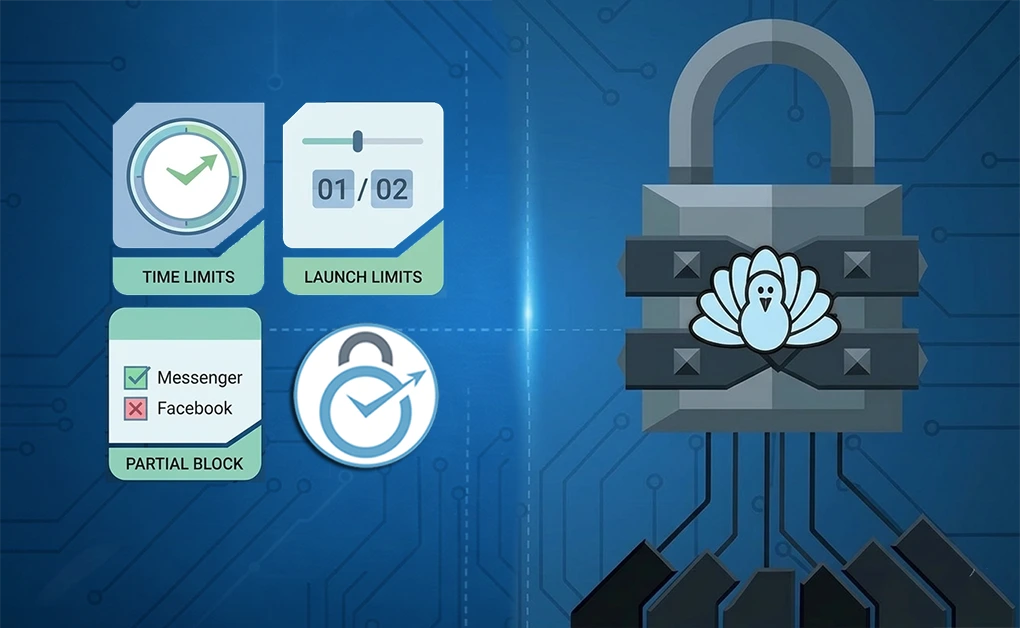
This is where FocusMe and Cold Turkey differ most.
FocusMe’s Flexible Approach
FocusMe is built for users who want to moderate their usage rather than eliminate it entirely. Its standout features include:
- Time limiters: Set a specific number of hours per day, week, or month for distracting sites. Once you hit the limit, the site is blocked until the period resets.
- Launch limiters: Control how many times you can open a site, how long each session can last, and enforce waiting periods between launches. For example: check email twice a day, 30 minutes max, with 6-hour gaps between sessions.
- Partial site blocking: Block Facebook but allow Messenger. Block entire sites but allow specific pages or subdomains. This granularity lets you keep access to what you need while cutting what you don’t.
FocusMe’s philosophy is gradual habit-building. Instead of going cold turkey (pun intended), you reduce usage over time until you’ve developed better self-control.
Cold Turkey’s Strict Approach
- Built for users who need hard boundaries. Its blocking is more binary: sites are either blocked or accessible, with less middle ground.
- Offers allowances (limited time on blocked sites before the block kicks in), but they’re less granular than FocusMe’s time and launch limiters. Cold Turkey’s strength is enforcement, not flexibility.
If you’ve tried flexible approaches and keep finding loopholes, Cold Turkey’s rigidity becomes an advantage rather than a limitation.
Lock Mechanisms and Enforcement Strength

Both apps offer ways to lock your settings, but Cold Turkey goes further with system-level protections.
FocusMe’s Lock Options
FocusMe provides four layers of protection:
- Reboot and uninstall protection: Blocks survive restarts, and you can prevent uninstallation during active sessions.
- Random password generator: Requires typing up to 2,000 random characters to unlock, creating significant friction.
- Custom password: Have a friend set the password so you can’t unlock it yourself.
- Forced Focus Mode: Removes all possibility of pausing or editing your plan until it completes.
Cold Turkey’s Lock Options
Cold Turkey offers similar lock types plus additional system-level protections:
- Timer lock: Block stays active until the timer expires.
- Random text lock: Type up to 999 random characters to unlock.
- Password lock (Pro): Require a password to disable.
- Restart lock: Block stays until you restart the computer.
- Time range lock: Prevent changes during specific hours.
Cold Turkey’s advantage is its bypass prevention at the system level:
- Blocks the task manager so you can’t kill processes
- Blocks system time changes so you can’t trick the timer
- Blocks the installer during active sessions so you can’t reinstall to reset
Cold Turkey also offers Frozen Turkey, which can lock, log off, or shut down your computer for a set period. This forces you to step away from the computer completely.
The Verdict on Enforcement
Cold Turkey is harder to bypass. FocusMe’s Forced Mode is strong, but Cold Turkey’s system-level protections make it the more secure option for users who don’t trust themselves during moments of weakness.
FocusMe’s longer random text option (2,000 vs 999 characters) provides more friction, but friction isn’t the same as prevention. Cold Turkey actively blocks the tools you’d use to circumvent it.
Pricing
| Aspect | FocusMe | Cold Turkey |
| Free Version | 14-30 day trial | Yes (limited features) |
| Paid Pricing | Subscription ($6.95-$12.95/month) | $45 one-time (Pro) |
| Money-Back Guarantee | 60 days | 30 days |
Cold Turkey is cheaper long-term. After the first year, FocusMe’s subscription costs exceed Cold Turkey’s one-time price. However, FocusMe includes ongoing updates and supports more platforms (Linux, Android) that Cold Turkey doesn’t cover at any price.
Which App Fits Your Needs?
FocusMe Fits Better If You:
- Want to moderate access rather than block completely
- Need time limiters and launch limits for gradual habit-building
- Use Linux or need an Android app blocking
- Prefer detailed activity tracking to understand your usage patterns
- Want flexibility to adjust rules as your needs change
Cold Turkey Fits Better If You:
- Need the strictest possible enforcement
- Want bypass prevention that blocks task manager and system time changes
- Prefer one-time payment over ongoing subscriptions
- Only use Windows or Mac
- Need a Frozen Turkey to force yourself away from the computer entirely
- Have tried flexible approaches and found them too easy to circumvent
DigitalZen Offers Balanced Enforcement Without Extreme Rigidity
If Cold Turkey feels too strict and FocusMe feels too flexible, DigitalZen offers a middle ground.
The problem with extremes: Cold Turkey’s nuclear approach can feel punishing when you legitimately need to access something you blocked. FocusMe’s flexibility can feel too easy to work around when willpower is low. Neither extreme fits every user.
DigitalZen’s balanced approach:
- Firm but not punishing: Strong enough to resist impulsive bypass attempts, flexible enough for real-world use
- Adaptive lock mechanisms: Code locks, cooldown timers, friend verification, and future-date locks create friction without a complete lockout
- Cross-platform support: Works as a website blocker for Windows, Mac, and Linux
- Block and allow modes: Choose between blocking specific sites or allowing only approved sites
- Scheduled blocking: Set work hours and focus sessions that activate automatically
DigitalZen works for users who want enforcement that holds up against impulse but doesn’t trap them when circumstances change. It’s designed for balanced productivity rather than digital punishment.
The Right Tool Depends on Your Enforcement Needs

FocusMe and Cold Turkey both help you block distractions, but they serve different needs.
FocusMe is the better choice for users who want to moderate their habits gradually. Its time limiters, launch limits, and activity tracking support a flexible approach to building discipline. It’s also the only option if you need Linux or Android support.
Cold Turkey is the better choice for users who need a strict enforcement that they can’t easily undo. Its system-level bypass prevention, task manager blocking, and Frozen Turkey feature make it one of the hardest blockers to circumvent.
DigitalZen offers a middle path for users who find Cold Turkey too rigid and FocusMe too flexible. Its adaptive lock mechanisms provide firm resistance without complete lockout, making it a practical choice for balanced productivity. For a broader comparison of options, we’ve reviewed the best website blockers for productivity.
Frequently Asked Questions
Does FocusMe Work on Linux?
Yes. FocusMe supports Windows, Mac, Linux, and Android. Cold Turkey only supports Windows and Mac, with no Linux or mobile versions.
Which App Has Stronger Bypass Prevention?
Cold Turkey. It blocks the task manager, prevents system time changes, and locks the installer during active sessions. FocusMe has Forced Mode but fewer system-level protections.
Can FocusMe Limit Time on Websites Instead of Blocking Completely?
Yes. FocusMe’s time limiter lets you set time limits for specific sites, per day, week, or month. This is more granular than Cold Turkey’s allowance system.
Is Cold Turkey Free?
Cold Turkey offers a free version with limited features. The Pro version costs $45 as a one-time purchase and unlocks all features, including password locks and scheduled blocking.
What Is Frozen Turkey?
Frozen Turkey is a Cold Turkey feature that can lock, log off, or shut down your computer. You can’t use your computer at all until the timer expires. This forces you to step away completely.
References: