
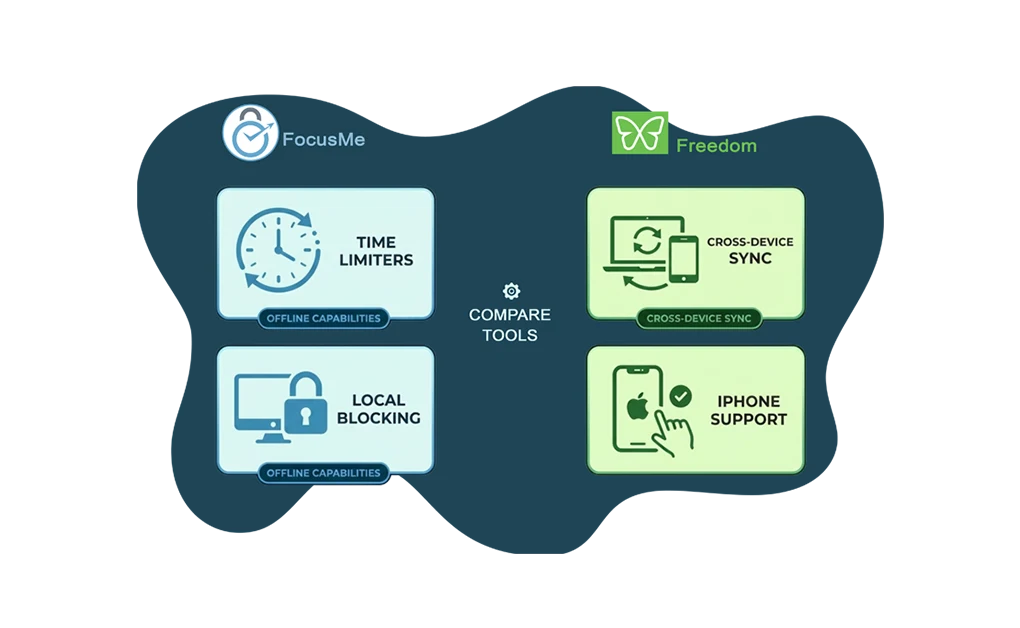
FocusMe and Freedom both block distracting websites and apps, but they solve different problems. FocusMe offers time limiters and local blocking that works offline. Freedom stands out for cross-device sync and iPhone support. The better choice depends on whether you want granular control or cross-platform simplicity.
Key Takeaways
- FocusMe offers time limiters that Freedom lacks: You can allow a set amount of daily or weekly usage, while Freedom only blocks or allows sites during sessions.
- Freedom works on more platforms, including iOS: FocusMe supports Windows, Mac, Linux, and Android, while Freedom adds iOS, Chromebook, and cross-device sync.
- FocusMe blocks locally while Freedom relies more on cloud-based blocking: FocusMe works offline, while Freedom depends more on an internet connection for its synced blocking approach.
- Freedom is generally more affordable and includes a free tier: FocusMe starts at a higher price and offers a trial instead of a free plan.
- FocusMe has a steeper learning curve: More features mean more setup time, while Freedom prioritizes simplicity.
Disclaimer: This article was published in April 2026. It reflects the app details available at the time of posting. Notice an error? Let us know and we’ll fix it!
FocusMe vs Freedom at a Glance
| Feature | FocusMe | Freedom |
| Windows | Yes | Yes |
| Mac | Yes | Yes |
| Linux | Yes (desktop) | Browser extension only |
| iOS | No | Yes |
| Android | Yes | Yes |
| Chromebook | No | Yes |
| Cross-device sync | No | Yes |
| Time limiters | Yes | No |
| Blocking method | Local system-level | Cloud/proxy-based |
| Works offline | Yes | No |
| Free tier | 14-day trial | Yes (limited) |
| Starting price | $6.95/month | $3.33/month |
| Lifetime option | $359 | $99.50 |
FocusMe Works on Linux While Freedom Works on iPhone
Platform support is where these tools differ most.
FocusMe runs on Windows, Mac, Linux, and Android. It is one of the few blockers with full Linux desktop support. But FocusMe does not work on iOS. iPhone and iPad users cannot use it.
Freedom covers Windows, Mac, iOS, Android, and Chromebook. Sessions sync across all devices. Start a block on your laptop. It applies to your phone automatically. But Freedom’s Linux support is limited to a Chrome browser extension, which blocks websites but not desktop apps.
FocusMe Blocks Locally While Freedom Blocks Through the Cloud
The blocking methods are fundamentally different.
FocusMe uses local system-level blocking. It installs on your device and intercepts traffic directly. No internet connection is needed. Your blocklists and usage data stay on your computer. Privacy-conscious users prefer this.
Freedom uses a cloud-based approach. When you start a session, Freedom routes traffic through its servers. This allows cross-device sync. But it requires an internet connection. If your internet connection drops, Freedom may be less reliable than FocusMe because it relies more on cloud-based blocking.
The practical difference? Reliability versus convenience. FocusMe works anywhere. Use it on a plane with no Wi-Fi. Freedom lets you manage all devices from one dashboard. But it needs an internet connection.
FocusMe Lets You Set Daily Time Limits While Freedom Only Blocks or Allows
This is where FocusMe stands apart. FocusMe’s time limiters let you set specific usage allowances instead of blocking a site completely from the start.
- Allow 30 minutes of YouTube per day
- Allow one hour of Reddit per week
- Allow two hours of gaming per month
Launch limiters add another layer of control. You can set both how often a site can be opened and how long each visit can last.
- Allow three visits to Twitter per day
- Cap each visit at 10 minutes
Freedom does not offer time limiters. During a session, sites are either blocked or accessible. You cannot set a rule like “allow 20 minutes of Instagram today.”
Want to moderate usage rather than block completely? FocusMe is the better fit. Blocking websites and apps can boost productivity either way, but time limiters support a more gradual habit-building approach.
FocusMe Is Harder to Bypass but Takes Longer to Learn
Both tools offer lock mechanisms, but they differ in strength and complexity.
FocusMe adds more friction if you try to override your rules:
- Forced Mode locks your blocking plan until the session ends
- Random text lock can require typing up to 2,000 characters to disable it
- Reboot protection means restarting your computer will not end the block
Freedom offers a simpler lock setup, but with less resistance:
- Locked Mode in the Premium plan prevents ending a session early
- Uninstall protection is available, but requires enabling multiple settings
- Bypassing requires more steps than FocusMe’s Forced Mode
Both tools can be bypassed with enough effort, but FocusMe creates a stronger barrier for users who tend to override their own rules.
The tradeoff is complexity. FocusMe includes more features, which means more settings to configure.
- Time limiters
- Launch limiters
- Scheduled blocks
- Forced Mode
Freedom prioritizes simplicity instead. You can select preset blocklists or add your own sites, choose a session length, and start blocking quickly. The dashboard is clean, and most users can get started much faster.
How FocusMe and Freedom Compare on Price and Value
| Plan | FocusMe | Freedom |
| Free tier | 14-day trial only | Yes (limited free tier) |
| Monthly | $12.95/month | $8.99/month |
| Yearly | $9.95/month | $39.99/year |
| 2-Year | $6.95/month | Not available |
| Lifetime | $359 | $99.50 |
| Guarantee | 60-day money-back | 7-day free trial |
Freedom is generally more affordable than FocusMe across its main plans, and it also offers a free tier. Its free tier includes blocking, sync, custom blocklists, and focus sounds. Premium adds scheduling, recurring sessions, and Locked Mode.
FocusMe costs more. But it includes features Freedom lacks. Time limiters and stronger bypass prevention may justify the price. The 60-day money-back guarantee gives you time to evaluate.
Choose FocusMe If You Need Time Limits or Linux Support
FocusMe fits users who want to moderate usage. Its time limiters let you build habits gradually. You do not have to block everything. Offline functionality helps travelers.
FocusMe is also better for Linux users. It offers a full desktop app. Not just a browser extension. It covers Windows, Mac, and Linux equally.
The tradeoff is cost and complexity. FocusMe requires more setup. It costs more than Freedom. For simple blocking without time limiters, it may be overkill.
For users deciding between FocusMe and stricter options, we cover the details in comparing FocusMe and Cold Turkey.
Choose Freedom If You Need iOS or Cross-Device Sync
Freedom fits users who need mobile blocking. It has full iOS support. Sessions sync across all devices. Block distractions everywhere with one setup.
Freedom also works for users who want quick results. The interface is simple. Preset blocklists save time. The free tier lets you test features first.
The tradeoff is flexibility. Freedom cannot set daily time limits. It blocks or allows. No middle ground. Want to gradually reduce social media? Freedom does not support that.
For users comparing Freedom with stricter desktop blockers, we cover the details in comparing Cold Turkey and Freedom.
DigitalZen Offers a Middle Ground Between FocusMe and Freedom
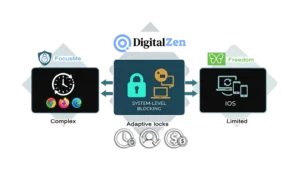
If FocusMe feels too complex and Freedom feels too limited, DigitalZen offers a middle ground. It is a website and app blocker for Windows, Mac, and Linux that combines strong blocking with a simpler setup.
Like FocusMe, DigitalZen uses system-level blocking across all browsers and can block unknown browsers automatically. Like Freedom, it has a cleaner interface that is easier to set up. It also adds adaptive locks such as cooldown timers, friend verification, and money penalties, along with daily allowances and anti-uninstall protection.
DigitalZen does not offer mobile support yet, so Freedom is still the better fit if iPhone or Android blocking is essential right now. For desktop users who want strong blocking without as much complexity, DigitalZen can be a better overall balance.
Frequently Asked Questions
Does FocusMe Work on iPhone?
No. FocusMe does not have an iOS app. It works on Windows, Mac, Linux, and Android only. For iPhone blocking, Freedom is the better option.
Does Freedom Work Offline?
Freedom uses a cloud-based approach and cross-device syncing, while FocusMe uses local system-level blocking that works offline. For users who need a blocker that does not depend on cloud-based syncing, FocusMe is the better fit.
Which One Is Harder to Bypass?
FocusMe is harder to bypass. Its Forced Mode locks your plan until the session ends. The random text lock requires typing up to 2,000 characters. Freedom’s Locked Mode prevents ending sessions early. It includes uninstall protection, but it requires enabling multiple settings and is less persistent than FocusMe’s Forced Mode.
Can You Set Daily Time Limits With Freedom?
No. Freedom uses session-based blocking only. Sites are blocked or accessible. No time limits. FocusMe offers this feature. Set limits by day, week, or month.
References:
- https://focusme.com/
- https://focusme.com/pricing/
- https://focusme.com/lifetime-offer/
- https://freedom.to/
- https://freedom.to/premium
- https://support.freedom.to/en/articles/6116638-how-to-prevent-uninstallation-of-the-freedom-app
- https://support.freedom.to/en/articles/1802927-locked-mode
- https://support.freedom.to/en/articles/6350166-freedom-for-ios-app-options-explained
- https://support.freedom.to/en/articles/6350161-freedom-for-android-app-options-explained