

Cold Turkey is one of the strongest website blockers for Windows. But it’s also one of the strictest. If you need blocking that’s firm but not extreme, several alternatives offer more flexibility. Tools like DigitalZen, Freedom, and FocusMe let you set time limits, use adaptive locks, and adjust settings without being completely locked out.
Key Takeaways
- Cold Turkey’s strict approach does not work for everyone: While it offers strong enforcement, many users look for alternatives with more flexible locks, daily limits, and easier-to-adjust blocking rules.
- System-level blockers offer stronger protection than browser extensions: Tools like DigitalZen, Freedom, and FocusMe block all browsers and desktop apps. Browser extensions like LeechBlock only work inside one browser.
- Several alternatives include time limits and allowances: Tools like FocusMe and DigitalZen let you set daily limits instead of blocking completely.
- Free options exist, but have trade-offs: LeechBlock and Pluckeye are free. LeechBlock is browser-only, while Pluckeye has a steeper learning curve.
- Windows has built-in blocking methods: The hosts file, Family Safety, and Firewall can block sites without extra software, but they are easier to undo and lack advanced scheduling.
Disclaimer: This article was published in April 2026. It reflects the app details available at the time of posting. Notice an error? Let us know and we’ll fix it!
6 Cold Turkey Alternatives for Windows

1. DigitalZen
DigitalZen is a website and app blocker for Windows that offers strong blocking with built-in flexibility. It blocks all modern browsers from one configuration. It can also block unknown browsers automatically, closing the “just use a different browser” loophole.
Key features:
- Blocks all browsers, plus unknown/unsupported browsers automatically
- App blocking for desktop applications
- Five adaptive locks: code, cooldown, friend verification, schedule, money penalty
- Daily allowances for flexible time-limited access
- Focus sessions for structured work periods
- Team Focus for groups that want to get into focus together
- Anti-uninstall protection for app and browser extensions
- Pre-defined templates for quick setup
Why it solves Cold Turkey’s problems:
DigitalZen’s locks are firm but not punishing. You choose your commitment level. The cooldown lock makes you wait before unlocking. The friend verification lock requires approval from someone you trust. These add friction without a complete lockout.
Time limits and allowances let you moderate instead of block completely. You can allow 30 minutes of social media per day. Cold Turkey doesn’t offer this.
Limitations: Desktop-only (Windows, Mac, Linux). Mobile apps in development.
Pricing: Free Basic / $3/month Premium (billed annually) / $119 lifetime
Best for: Users who want strong blocking with flexibility and adaptive locks.
2. Freedom
Freedom blocks distractions across all your devices at once. It works on Windows, Mac, iOS, Android, and Chromebook. If your phone is part of the distraction problem, Freedom is the only tool on this list that covers it.
Key features:
- Sessions sync across all devices simultaneously
- Locked Mode prevents ending sessions early (Premium)
- Focus sounds and ambient music for concentration
- Recurring schedules for automated blocking
Limitations: Weaker bypass prevention; some users report it’s easier to disable than Cold Turkey or DigitalZen. No task manager blocking or uninstall protection.
Pricing: Free (7 sessions) / $39.99/year / $99.50 lifetime
Best for: Users who need mobile blocking and cross-device sync.
3. FocusMe
FocusMe lets you moderate usage instead of blocking completely. Its time limiters let you set specific hours per day, week, or month for distracting sites. This works well for users who want gradual habit-building.
Key features:
- Time limiters set hours per day/week/month for specific sites
- Launch limiters control how often and how long you can access sites
- Random text lock up to 2,000 characters
- Forced Mode prevents editing active plans
- Supports Windows, Mac, Linux, and Android
Limitations: Subscription pricing adds up over time. No iOS app. Interface has a steeper learning curve.
Pricing: $12.95/month (60-day money-back guarantee)
Best for: Users who want to gradually reduce usage with time limits instead of hard blocks.
If you’re weighing both options, we cover the details of the comparison between FocusMe and Freedom.
4. Pluckeye
Pluckeye takes a unique approach. Instead of passwords or locks, it uses a delay system. Changes to your settings don’t take effect until later. This gives you time to reconsider impulsive decisions.
Key features:
- Delay-based system (changes take effect after a waiting period you set)
- System-level blocking across all browsers
- Blocks all images and videos from the internet by default
- Uninstall prevention when delay is non-zero
- Supports Windows, Mac, and Linux: Cold Turkey doesn’t support Linux, so this matters for cross-platform users
Limitations: Very aggressive defaults. Blocks all images and videos unless you allow them. Command-line configuration required for advanced features. Steep learning curve.
Pricing: Free / Pay-what-you-want ($3–$7/month suggested)
Best for: Users who want a delay-based approach that forces reconsideration before changing settings.
5. LeechBlock NG
LeechBlock NG is a free browser extension with powerful scheduling options. It offers up to 30 separate block sets, each with different rules and schedules.
Key features:
- Up to 30 separate block sets with different schedules
- Time limits (allow X minutes per hour or per day)
- Password or random access code protection
- Works on Chrome, Firefox, Edge, Brave, Opera, Vivaldi
- Lightweight and privacy-focused
Limitations: Browser extension only. No app blocking. Easy to bypass by switching browsers, using incognito mode, or uninstalling.
Pricing: Free
Best for: Users who want a free, flexible browser extension and don’t need system-level blocking.
6. BlockSite
BlockSite offers a simple setup with basic blocking features. It has both a browser extension and a desktop app that blocks multiple browsers at once.
Key features:
- Block sites by URL, category, or keyword
- Focus Mode for timed sessions
- Schedule blocking for specific times
- Password protection and uninstall prevention (Premium)
- Cross-device sync between desktop and mobile
- Mobile apps for iOS and Android
Limitations: Free version limited to 6 sites. Some users report sync issues and aggressive upselling. Weaker bypass prevention than dedicated desktop blockers. A browser extension is easier to bypass than system-level tools
Pricing: Free (6 sites) / $3.99/month (annual) / $10.99/month / $29.99 lifetime (promotional)
Best for: Users who want a quick, simple setup with basic blocking and mobile support.
Quick Comparison Table
| Feature | DigitalZen | Freedom | FocusMe | Pluckeye | LeechBlock NG | BlockSite |
| Type | Desktop | Desktop + Mobile | Desktop + Mobile | Desktop | Extension | Desktop + Mobile |
| App Blocking | Yes | Yes | Yes | Limited | No | No |
| Time Limits | Yes | No | Yes | No | Yes | Yes |
| Uninstall Protection | Yes | Yes (during sessions) | Yes | Yes (with delay) | No | Limited (Premium) |
| Focus Sessions | Yes | No | Yes | No | No | Yes |
| Team Focus | Yes | No | No | No | No | No |
| Mobile | — | iOS, Android | Android | — | — | iOS, Android |
| Pricing | Free / $3/mo | $39.99/yr | $12.95/mo | Free / $3–$7/mo | Free | Free / $10.99/mo+ |
How Hard Is Each Cold Turkey Alternative to Bypass on Windows?
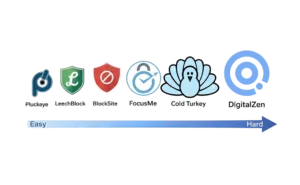
Knowing what a blocker does is only half the decision. The other half is knowing how easy it is to cheat.
If You Switch Browsers to Get Around Blockers
Browser extensions like LeechBlock NG only work inside one browser. Block YouTube in Chrome, and you can still open it in Firefox.
System-level blockers like DigitalZen, FocusMe, and Freedom block sites across all browsers. DigitalZen also blocks unknown or newly installed browsers automatically.
If You Uninstall Blockers When Cravings Hit
DigitalZen has anti-uninstall protection while blocks are active. FocusMe’s Forced Mode locks your plan until it ends. Pluckeye requires waiting through your configured delay period before uninstalling.
LeechBlock and BlockSite are easier to remove. A few clicks and they’re gone.
If Changing Settings Is Your Usual Loophole
DigitalZen’s adaptive locks add friction without a complete lockout. The cooldown lock makes you wait. The friend verification lock requires someone else to approve. The money penalty lock charges you for overriding early.
FocusMe’s Forced Mode locks your plan entirely. Pluckeye’s delay system means changes won’t apply until later.
If You Want Flexibility Without Making Bypass Too Easy
Cold Turkey is hard to bypass but too rigid for some users. Many other blockers are flexible but too easy to override.
The sweet spot is a blocker that’s annoying to bypass but not impossible. DigitalZen and FocusMe hit this balance. You get daily allowances and time limits, but overriding requires going through friction like cooldowns or friend approval.
Windows Built-In Blocking Methods
Blocking websites on Windows without extra software is possible. These native tools are free but come with limitations.
1. Hosts File
The hosts file redirects domain names to nowhere. It works across all browsers without any software.
How to access: Open C:\Windows\System32\drivers\etc\hosts as administrator.
How it works: Add lines like 127.0.0.1 facebook.com to block specific domains.
Pros: Free, works across all browsers, no software needed.
Cons: Easy to undo, no scheduling, no app blocking, requires admin access. Tech-savvy users can reverse changes in seconds.
2. Microsoft Family Safety
Family Safety offers parental controls for website filtering and screen time limits.
How to access: Settings → Accounts → Family (Windows 10/11)
How it works: Add family members and set content filters, screen time limits, and app restrictions.
Pros: Built into Windows 10/11, includes screen time limits, web filtering by category.
Cons: Requires Microsoft account, designed for families, easy to disable for admin users. Not ideal for self-control.
3. Windows Firewall
Windows Firewall can block outbound connections for specific applications.
How to access: Windows Defender Firewall → Advanced Settings → Outbound Rules
How it works: Create rules to block specific .exe files from accessing the internet.
Pros: Can block apps (not just websites), built into Windows, no software needed.
Cons: Complex setup, no scheduling, blocks apps entirely rather than specific sites. Doesn’t work for browser-based distractions.
These methods work for basic blocking. For stronger enforcement, scheduling, and time limits, a dedicated tool is more effective.
Why Users Look for Cold Turkey Alternatives
Cold Turkey works well for users who need extreme enforcement. But that approach creates problems for others.
- $45 one-time cost with a learning curve: Cold Turkey offers a 7-day trial and a 30-day refund. But the app’s strictness becomes clear only after extended use. By then, some users feel committed to a tool that doesn’t match their workflow.
- Locks are too strict: Frozen Turkey locks your entire computer. Random text locks can’t be undone. Some users feel trapped rather than helped.
- Limited allowances in Pro: You can set breaks and allowances, but they’re less flexible than tools like FocusMe or DigitalZen.
- No mobile apps: Cold Turkey only works on Windows and Mac. Your phone remains a distraction source with no way to sync blocking across devices.
- No cross-device sync: Blocking on your desktop doesn’t affect your laptop. You need to configure each device separately.
Cold Turkey includes timed blocks, breaks, and some allowance-style controls, but its overall approach is still stricter and less flexibility-oriented than tools built around daily limits, adaptive unlocks, or moderation-based usage.
Finding the Right Balance Between Strict and Flexible
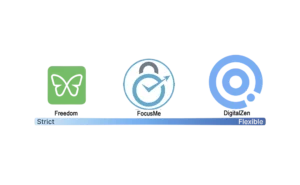
Cold Turkey works well for users who need extreme enforcement. But that approach doesn’t fit everyone.
Some people need room to adjust. Others want time limits instead of total blocks. The right alternative depends on your self-control style.
If you need firm boundaries without feeling trapped, DigitalZen’s adaptive locks offer a middle ground. If you want gradual habit-building, FocusMe’s time limiters help. If mobile is your weak spot, Freedom covers all devices.
Start with one tool. Adjust as you learn your patterns. The goal is to block that helps you focus without making you feel punished. If you use Linux as well, check out our list of alternatives for Linux users.
Frequently Asked Questions
Is There a Free Alternative to Cold Turkey for Windows?
Yes. LeechBlock NG is free but browser-only. Pluckeye is free with a pay-what-you-want option. DigitalZen has a free Basic tier with system-level blocking across all browsers. Windows also has built-in methods like the hosts file and Family Safety.
Which Cold Turkey Alternative Has the Best Bypass Prevention?
Pluckeye uses a delay system that’s hard to bypass impulsively. DigitalZen offers adaptive locks including friend verification and money penalties, plus anti-uninstall protection. FocusMe has Forced Mode and random text locks up to 2,000 characters. Browser extensions like LeechBlock and BlockSite are easier to bypass.
Can I Set Time Limits Instead of Blocking Completely?
Yes. FocusMe offers time limiters for specific sites, hours per day, week, or month. DigitalZen includes daily allowances and Pomodoro-style focus sessions. LeechBlock NG also supports time limits per hour or per day. Cold Turkey’s allowance system is more limited.
Does Any Alternative Work on Both Windows and Mobile?
Freedom works on Windows, Mac, iOS, and Android with cross-device sync. BlockSite has mobile apps for iOS and Android. FocusMe supports Android but not iOS. DigitalZen, Pluckeye, and LeechBlock are desktop-only.
What’s the Difference Between Browser Extensions and System-Level Blockers?
Browser extensions like LeechBlock only work inside one browser. You can bypass them by switching browsers, using incognito mode, or uninstalling. System-level blockers like DigitalZen, Freedom, and FocusMe work across all browsers and can block desktop apps too. They’re harder to bypass.
References:
- https://getcoldturkey.com/
- https://freedom.to/
- https://focusme.com/
- https://www.digitalzen.app/
- https://www.pluckeye.net/
- https://www.proginosko.com/leechblock/
- https://blocksite.co/