

Blocking gambling sites on Windows requires multiple layers. No single method stops all access. DNS filtering blocks gambling categories across all browsers. System-level tools block betting apps, not just websites. Lock mechanisms prevent impulsive changes during weak moments. This guide covers methods for adults blocking themselves and parents protecting children from sports betting content.
Key Takeaways
- DNS filtering blocks gambling sites across all browsers at the network level: Free services like OpenDNS offer gambling category filters without installing software.
- System-level tools block betting apps, not just websites: Desktop clients for DraftKings, FanDuel, and others bypass browser-based blocking.
- Pre-defined gambling blocklists can save setup time: Some system-level tools include ready-made gambling filters, so you do not need to build a manual list of domains.
- Lock mechanisms prevent impulsive changes during weak moments: Code locks, cooldown timers, and friend-locks add friction before you can disable protections.
- Layering multiple methods creates stronger protection: DNS filtering plus system-level tools plus lock mechanisms closes gaps that any single method leaves open.
Why Blocking Gambling Sites Takes Multiple Layers
Online sports betting is widely available in the U.S., and mobile access has made it easier to place bets quickly. Betting ads are also common during sports coverage, and fantasy sports platforms can make the line between gaming and gambling feel less clear for some users.
Each blocking method has weaknesses on its own. DNS filtering can be bypassed by changing settings or using a VPN. Browser extensions only protect one browser. The hosts file requires manual updates for every new site.
Gambling also differs from other content categories in important ways.
- Financial consequences can happen quickly: a gambling session can lead to substantial losses in a short time, so speed matters when blocking.
- Betting apps are a major access point: for many sports bettors, mobile apps like DraftKings, FanDuel, and BetMGM make access fast and convenient. Browser blocking alone can miss part of that access.
- For some people, urges may follow patterns: sports events, weekends, paydays, and stressful periods can be higher-risk times. Extra blocking during those windows can help.
Two groups typically need gambling blocks. Adults may want to block access for themselves for financial, personal, or recovery reasons. Parents may want to protect children and teens from sports betting ads and sites. Both groups can benefit from layered protection.
Blocking Betting Apps on Windows

Many gambling platforms are accessible on Windows through desktop browsers, and some also offer apps or additional software in certain contexts. Dedicated betting apps can be harder to block with browser-only methods, and DNS or hosts-file blocking may be less reliable than system-level app controls.
To block betting apps:
- Uninstall existing apps: Remove DraftKings, FanDuel, BetMGM, and any other betting apps from your computer.
- Use a system-level tool with app blocking: Tools like DigitalZen can block specific desktop applications, not just websites.
- Enable uninstall protection: This makes it harder to reinstall apps during high-risk moments.
- Use a standard user account: Without admin rights, installing new apps requires a password. This adds friction.
If betting apps are your main access point, blocking them may matter more than browser-based site blocking. If most of your gambling happens through apps, start here.
Using DigitalZen for System-Level Protection
System-level tools work across all browsers. They can also block apps, not just websites. Many include features to prevent tampering and bypassing.
DigitalZen
DigitalZen is a Windows web and app blocker. It also works on Mac and Linux. It can block websites and desktop apps. It also includes lock features and uninstall protection.
Gambling-specific features:
- Pre-defined gambling blocklist. Covers major betting sites without manual setup.
- App blocking. Stops DraftKings, FanDuel, BetMGM desktop clients and other betting apps.
- Schedule lock. Lets you block gambling during high-risk periods like weekends or game nights.
- Money lock. Creates financial friction before you can disable protections. This can be fitting for gambling-related blocking.
- Tamper protection. Uninstall protection, extension removal protection, and app termination protection prevent impulsive bypasses.
Pricing:
- Free basic version
- Premium costs $3 per month (billed annually)
- Lifetime access costs USD 119
Using DNS Filtering for Gambling Blocks
DNS filtering blocks sites at the network level. It can work across browsers without a browser extension. It works when your device or router uses that DNS service. When you try to visit a blocked domain, the DNS service does not resolve it normally.
OpenDNS
OpenDNS offers a free Home plan with customizable filtering. Check the dashboard to confirm whether the Gambling category is available in your plan.
DNS addresses:
- Primary: 208.67.222.222
- Secondary: 208.67.220.220
Setup requires a free account. After setup, you can manage filtering in the dashboard.
CleanBrowsing
CleanBrowsing’s free filters focus on adult content and security. Gambling-specific filtering may require a paid plan. Paid plans unlock more content categories.
DNS addresses (Family Filter):
- Primary: 185.228.168.168
- Secondary: 185.228.169.168
The Family Filter blocks adult content and enforces SafeSearch. For gambling-specific blocking, check the paid plans.
Cloudflare Gateway
Cloudflare’s Zero Trust service offers custom blocking policies and domain categories. Setup is more technical than typical home DNS filters. It works best for users who are comfortable with network setup.
How to Configure DNS on Windows
- Press Windows + I to open Settings.
- Go to Network & internet.
- Select your active Wi-Fi or Ethernet connection.
- Find the IP or DNS settings section and click Edit.
- Switch to Manual if needed.
- Enable IPv4 and enter your DNS addresses.
- Click Save.
Router-Level Setup
Configuring DNS on your router protects all devices on your network. This includes phones, tablets, game consoles, and smart TVs.
- Log in to your router’s admin panel. This is often 192.168.1.1 or 192.168.0.1.
- Find the DNS settings under WAN or Internet.
- Replace your current DNS addresses with the filtering DNS addresses.
- Save the changes and reboot the router.
Limitations
DNS filtering is not foolproof. Users can bypass it by changing DNS settings. VPNs can also bypass it. Mobile data bypasses your home network entirely. DNS filtering is also less reliable for betting apps than for browser-based access.
Major Gambling Domains and Betting Platforms

If you need to block sites manually, here are some major platforms to include. This list is only a starting point. New domains, subdomains, and pages can appear over time. DNS filtering or broader blocklists usually provide better coverage.
Major betting and casino sites:
- draftkings.com
- sportsbook.draftkings.com
- fanduel.com
- sportsbook.fanduel.com
- betmgm.com
- caesars.com
- caesars.com/sportsbook
- goldennuggetcasino.com
- betrivers.com
- espnbet.com
- bet365.com
Poker:
- pokerstars.com
- wsop.com
- 888poker.com
- partypoker.com
Fantasy sports:
- draftkings.com
- fanduel.com
- sports.yahoo.com/fantasy
For broader coverage, DNS filtering with gambling categories or system-level tools with larger blocklists usually work better than manual blocking.
Blocking During High-Risk Periods
For some people, gambling urges may follow patterns. Sports events, weekends, paydays, and late nights can be harder times. Planning ahead is often easier than deciding in the moment.
Schedule locks let you set stricter blocks during higher-risk times. For example:
- Block all gambling sites from Friday evening to Sunday night
- Add extra protection during major sports events
- Enable stricter locks on paydays
Cooldown timers add friction during impulsive moments. If you try to disable protections, you must wait before changes take effect. That pause can give you time to reconsider.
Friend lock sends the unlock code to a trusted person. You cannot disable protections without their involvement. Having to ask for the code may help interrupt the impulse.
These features are available in system-level tools like DigitalZen. They can work well for users who know their patterns and want to plan ahead.
Building a Gambling Block System That Holds
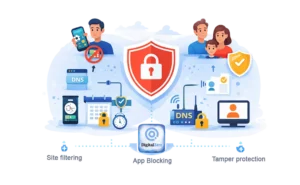
Gambling blocking differs from other content categories. Financial consequences can happen quickly. Apps are a major access point. Urges may follow patterns.
A system that holds should address these realities.
For adults blocking for themselves:
- Block betting apps first. Do this if apps are your main access point. Uninstall existing apps and use app-level blocking.
- Add DNS filtering. This helps cover browser-based gambling sites across browsers.
- Use schedule locks during high-risk periods. Block gambling during weekends, game days, or other trigger times.
- Enable friend-lock for stronger accountability. Having to ask someone else for the unlock code adds social friction.
For parents protecting children and teens:
- Focus on sports betting exposure. Children may see gambling ads during sports content. Fantasy sports can make betting feel more familiar to some children and teens.
- Router-level DNS blocks gambling across devices on your home network. This can help protect phones, tablets, and computers.
- Standard user accounts prevent app installation. Without admin rights, children cannot install new betting apps without approval.
- Consider talking about gambling risks. Blocking alone may not be enough. Open conversations can help children understand the risks. Family support and early intervention can help in prevention.
Some users need to block multiple content categories. Blocking adult content on Windows uses similar layering techniques for that category.
There are several Freedom app alternatives for Windows that offer different approaches to blocking, from productivity-focused to content filtering.
Blocking Gambling Sites on Windows Takes Layers
No single method blocks all gambling sites on Windows. DNS filtering is a strong starting point because it works across all browsers. Betting apps require system-level blocking since they bypass browser-based methods. Lock mechanisms prevent impulsive changes during weak moments.
The most effective approach combines multiple layers. Start with app blocking if most of your gambling happens through desktop apps. Add DNS filtering for browser-based sites. Use schedule locks during high-risk periods. Enable tamper protection to prevent bypasses.
Blocking websites on Windows is straightforward for users who only need to block specific URLs rather than entire categories.
These instructions are for Windows. For Linux users, blocking gambling sites on Linux covers the equivalent methods for that platform.
DigitalZen combines gambling site filtering with app blocking and tamper protection for stronger coverage.
If gambling is affecting your finances, relationships, or wellbeing, a blocker is one supportive tool rather than a treatment. Free, confidential support is available through the National Council on Problem Gambling helpline on 1-800-GAMBLER in the US, or the National Gambling Helpline in the UK.
Frequently Asked Questions
Can I Block Betting Apps on Windows?
Yes. System-level tools like DigitalZen can block desktop applications. DNS and hosts file methods mainly affect browser-based access. If betting apps are one of your main access points, app-level blocking and uninstall protection can help.
What Is the Best Free Method to Block Gambling Sites?
DNS filtering is one of the strongest free starting points. OpenDNS offers a free Home plan with customizable filtering. Setup requires creating an account and changing your DNS settings. Check the dashboard to confirm whether gambling filtering is available in your setup. DigitalZen also has a free tier for basic website blocking.
Can My Child Bypass These Protections?
Determined users may still find workarounds. They might use VPNs, change DNS settings, or switch to mobile data. Layering multiple methods makes bypassing harder. A standard user account without admin rights also limits what a child can change.
What Is the Difference Between Blocking and Self-Exclusion?
Blocking prevents access through technical measures on your device or network. Self-exclusion is a voluntary program where you ask gambling operators to restrict your account. Blocking works at the device or network level. Self-exclusion depends on the operator honoring your request. Both can be used together for stronger protection.
How Do I Block Gambling Sites on All Browsers?
DNS filtering can work across browsers when your device or router uses that DNS service. System-level tools like DigitalZen can also help block access across browsers through supported extensions and device-level controls. Browser extensions only protect the browser where they are installed.
References:
- https://www.cloudflare.com/learning/access-management/what-is-dns-filtering/
- https://cleanbrowsing.org/solutions/web-filtering