

Cold Turkey focuses on strict enforcement on desktops with strong lock mechanisms, while Freedom focuses on cross-device sessions that sync across phones and computers. Your choice depends on whether you want stronger blocking on one device or coordinated focus across several devices. Both tools also leave coverage gaps worth knowing about before you commit.
Key Takeaways
- Cold Turkey provides stronger bypass prevention than Freedom: Features like task manager blocking, random text locks up to 999 characters, and anti-uninstall protection make Cold Turkey hard to bypass during active blocks.
- Freedom syncs blocking sessions across multiple devices: A single session can apply to your phone, tablet, and computer at the same time, while Cold Turkey only blocks on the device where it is installed.
- Cold Turkey uses one-time pricing while Freedom uses subscription plans: Cold Turkey Pro costs $45 as a one-time purchase. Freedom costs $39.99 per year or $99.50 for lifetime access.
- Neither tool provides full Linux support: Cold Turkey has no Linux version. Freedom offers a Chrome extension for Linux that blocks websites in the browser, but it cannot block desktop apps.
- Both apps have real coverage gaps: Neither tool blocks in-app distractions on allowed sites, and each handles new browsers, private mode, and mobile webviews differently. Knowing these gaps helps set realistic expectations.
- DigitalZen provides system-level blocking across Windows, Mac, and Linux: For users who need strong enforcement with broader platform support, DigitalZen is another option that fills the gaps Cold Turkey and Freedom leave open.
Disclaimer: This article was published in March 2026. It reflects the app details available at the time of posting. Notice an error? Let us know and we’ll fix it!
What Is Cold Turkey?
Cold Turkey is a website and app blocker for Windows and macOS. It focuses on strict enforcement, with features like task manager locks, random text challenges, and anti-uninstall protection. These tools are designed to make blocks hard to bypass, even during moments of weak willpower.
What Is Freedom?
Freedom is a distraction blocker that works on Windows, macOS, iOS, Android, and Chromebooks. Its main feature is cross-device sync. When you start a session on your laptop, the same block can apply to your phone and tablet at the same time.
Platform Support and Device Compatibility

Cold Turkey works on desktop only, while Freedom works across desktop and mobile. The choice comes down to whether you need stronger blocking on one type of device or broader coverage across several.
Cold Turkey focuses on the desktop:
- Windows and macOS only
- No mobile apps
- Cold Turkey has no Linux version
Freedom takes a multi-platform approach:
- Windows, macOS, iOS, Android, Chromebook
- Freedom supports Linux via a Chrome extension only (no app blocking, Chrome browser only)
The trade-off is reach versus depth. Freedom covers more devices, but its blocking can be lighter on some platforms. Cold Turkey covers fewer devices, but its system-level features tend to be stronger on the ones it supports.
If you spend most of your day at a desktop, Cold Turkey may be the better fit. If you switch between phone, tablet, and laptop throughout the day, Freedom’s cross-device sync helps cover all of them at once.
Lock Mechanisms and Bypass Prevention

This is where Cold Turkey and Freedom differ the most. Cold Turkey uses system-level features to make blocks hard to undo. Freedom uses lighter controls that rely more on the user’s commitment.
Cold Turkey Lock Options
- Timer: Block stays active until the timer ends
- Random text: Type 1 to 999 random characters to unlock
- Password protection (Pro): Restricts access to settings or block changes
- Restart: Some blocks need a computer restart before changes apply
- Time range: Prevents changes during set hours
Cold Turkey also includes bypass prevention features:
- Blocks the task manager
- Prevents system time changes
- Locks the uninstaller during active blocks
Freedom Lock Options
- Locked Mode (Premium): Prevents ending a session early
- Disable Quit During Sessions: Optional setting to prevent quitting the app
Freedom has fewer system-level guardrails. It does not block the task manager, prevent system time changes, or stop uninstalls. A user who wants to break a session may find ways to do so. Cold Turkey, by contrast, blocks many of the common workarounds.
The Verdict on Enforcement: Cold Turkey tends to offer stronger enforcement. Freedom’s locks work best when the user is committed to staying in the session. Cold Turkey’s locks aim to hold up even when the user tries to bypass them.
What Cold Turkey and Freedom Don’t Block (And Why It Matters)
Both apps have real coverage gaps. Knowing them up front saves you from the “I’m blocked but still distracted” frustration.
1. In-App Distractions Inside Allowed Sites
Both apps block at the domain level, not the content level. If you allow YouTube for tutorials, the homepage feed, Shorts, and autoplay come with it. If you allow Twitter for research, the For You algorithm may load as soon as you sign in.
Cold Turkey supports blocking specific YouTube channels, but neither app hides recommendation feeds on sites you have allowed.
2. New Browsers Installed After Setup
Cold Turkey blocks through browser extensions. Any browser installed after setup may not have the extension yet. According to Cold Turkey’s user guide, a locked block can prevent Brave Tor windows and guest browsing. This only works once the extension is installed and set up correctly.
Freedom’s desktop blocking uses a local proxy that filters traffic before it reaches the browser. This usually covers new browsers without needing extra setup.
3. Private Mode and Browser Profiles
Cold Turkey requires you to turn on “Allow in incognito” for each browser. Its Firefox extension page describes this step as required to prevent an easy way around the block. If you skip it, private windows can bypass the block. Separate Chrome or Edge profiles also need the extension turned on one by one.
Freedom’s proxy avoids this issue on desktop. On iOS, Safari needs the Content Blocker and non-Safari browsers need the Freedom Profile (VPN). If another VPN is active on the device, Freedom’s blocking may not work reliably.
4. Mobile Browsers vs Mobile Apps
This gap mainly applies to Freedom, since Cold Turkey does not run on mobile.
Freedom’s iOS blocking uses Apple’s Screen Time, which limits blocking to 50 apps and categories per session. On older iOS versions, Freedom blocks by preventing new content from loading instead of fully blocking the app. Cached content may still appear.
There’s also the in-app browser issue. Tapping a link in Slack, Discord, or Twitter often opens an internal webview. Whether that webview is blocked depends on Freedom’s VPN profile being active. It is worth testing before relying on it.
Scheduling and Session Management
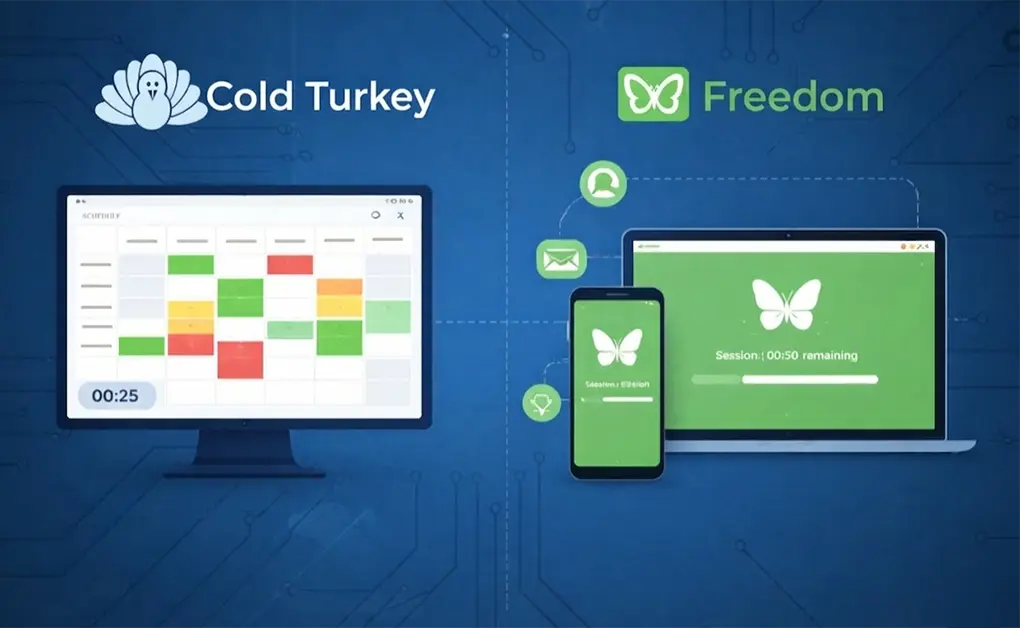
Cold Turkey and Freedom handle scheduling in different ways. Cold Turkey uses a weekly calendar view on a single device. Freedom uses sessions that can sync across all your devices.
Cold Turkey uses a visual weekly scheduler:
- Drag to create blocks on a calendar grid
- Schedules repeat each week automatically
- Includes Pomodoro timers and optional time allowances for limited access
- Applies only to the device it is installed on
Freedom uses session-based scheduling:
- Sessions start right away or at a scheduled time
- Sessions sync across all connected devices
- Phone, tablet, and computer enter the block together
Cold Turkey works well if you like planning your week visually on one device. Freedom works well if you want one session to apply across all your devices at once.
Pricing and Long-Term Value
| Plan | Cold Turkey | Freedom |
| Free | Basic features | 7 sessions, limited features |
| Paid | $45 one-time (Pro) | $39.99/year or $99.50 lifetime |
| Year 2 Cost | $0 | $39.99 (subscription) or $0 (lifetime) |
| Year 3 Cost | $0 | $39.99 (subscription) or $0 (lifetime) |
For desktop-only users, Cold Turkey is the better financial deal. For users who need mobile blocking and cross-device sync, Freedom’s price includes features Cold Turkey doesn’t offer at any price.
Side-by-Side Feature Comparison
| Feature | Cold Turkey | Freedom |
| Windows/macOS Support | Yes | Yes |
| iOS/Android Support | No | Yes |
| Linux Support | No | Chrome extension only |
| Website Blocking | Yes | Yes |
| App Blocking | Desktop only | Desktop and mobile |
| Block Entire Internet | Yes | Yes |
| Allowlist Mode | Yes | Yes (Mac/Windows only) |
| Cross-Device Sync | No | Yes |
| Scheduling | Yes (Pro) | Yes (Premium) |
| Pomodoro Timer | Yes | Yes |
| Random Text Lock | Yes (1-999 characters) | No |
| Password Lock | Yes (Pro) | No |
| Block Task Manager | Yes | No |
| Anti-Uninstall Protection | Yes | No |
| Focus Sounds | No | Yes |
Which One Should You Choose?
The right choice depends on the devices you use, the type of blocking you need, and your preference for pricing. Here is a quick guide to help you decide.
Choose Cold Turkey If You:
- Mainly use Windows or macOS
- Want strong bypass prevention that is hard to undo
- Prefer a one-time payment over a subscription
- Do not need mobile blocking or cross-device sync
Choose Freedom If You:
- Use several devices throughout the day
- Need blocking on iOS or Android
- Want sessions that sync across all devices
- Are okay with subscription pricing for cross-platform features
DigitalZen Offers System-Level Blocking Across All Major Platforms
DigitalZen is another option for users whose needs fall between Cold Turkey and Freedom. It is a focus and productivity app that combines system-level blocking with broader platform support than either tool offers on its own, with locks that aim to be firm without feeling punishing.
What DigitalZen offers:
- Cross-platform support: Works on Windows, Mac, and Linux natively
- System-level blocking: Blocks websites across all browsers (Chrome, Firefox, Edge, Brave, Opera) at the OS level
- Flexible modes: Includes both block mode and allow mode for different use cases
- Adaptive lock mechanisms: Code locks, cooldown timers, friend verification, future-date locks, and money penalty locks
- Scheduled blocking: Set work hours, focus sessions, or digital detox periods
DigitalZen can be a good fit for users who want strong enforcement and wider platform coverage. It may also help if you have been looking for a Cold Turkey alternative for Linux or if Freedom’s enforcement on non-mobile platforms has not worked for you.
Final Thoughts on Choosing the Right Focus Tool

The strongest blocking setup is usually not just one tool. It is a setup that covers websites and apps across all the devices you use, holds up when the urge to disable hits, and runs on a schedule so you do not have to start it manually.
Cold Turkey and Freedom each handle parts of this well, but each leaves a gap. Cold Turkey skips mobile and Linux. Freedom’s enforcement can feel lighter on a desktop and depends on the operating system.
DigitalZen brings system-level blocking, adaptive locks, and scheduled focus sessions into one tool that works on Windows, Mac, and Linux. It may suit users who want stronger enforcement than Freedom offers on desktop, or broader platform coverage than Cold Turkey supports. For a wider look at your options, we have reviewed the best website blockers for productivity.
Frequently Asked Questions
Is Cold Turkey Better Than Freedom?
It depends on what you need. Cold Turkey is stronger for desktop enforcement and uses one-time pricing. Freedom is better if you need cross-device sync and mobile support, which Cold Turkey does not offer.
Does Cold Turkey Work on Mobile?
No. Cold Turkey runs on Windows and macOS only. According to the developer, mobile operating systems do not allow the level of system access needed for strong bypass prevention.
Does Freedom Work on Linux?
Only in a limited way. Freedom offers a Chrome extension for Linux that blocks websites in Chrome only. It does not block desktop apps and does not work in Firefox or Edge. Linux users who need full blocking can explore Freedom app alternatives for Linux.
Can You Bypass Cold Turkey?
It is difficult during locked blocks. Cold Turkey blocks the task manager, prevents system time changes, and locks the uninstaller. No blocking tool is fully bypass-proof, but Cold Turkey is one of the harder ones to work around.
Is Freedom Free to Use?
Yes, in part. Freedom offers a free plan with seven sessions and limited features. Full features, including Locked Mode and scheduling, require Premium ($39.99 per year) or lifetime access ($99.50).
References: