

Finding a healthy screen-time balance is not about total abstinence. It is about noticing which apps and sites pull you off track, setting limits that tighten gradually, and building breaks into your day before the habit becomes harder to interrupt.
Abrupt bans can work for a few days, but they often lead to rebound scrolling. A gentler approach tends to last longer because it adds friction without turning your entire digital life into a punishment system.
Key Takeaways
-
- A healthy screen-time balance is not zero screen time: It is about whether your use feels intentional or compulsive.
- Abrupt bans often backfire: Extreme restrictions can lead to rebound scrolling once the rule breaks.
- Gradual reduction is usually easier to sustain: Small changes over several weeks give your habits time to adjust.
- Sleep and mornings are high-impact windows: The last hour before bed and the first hour after waking often shape the rest of the day.
- Gentle friction beats willpower: A limit you can keep past week three is more useful than a perfect rule you abandon after a few days.
Why Abrupt Screen-Time Bans Usually Fail
Most people have tried the “I’m just going to stop scrolling” plan.
It works beautifully for three days. Maybe five. Then one stressful evening arrives, and suddenly you are forty-seven minutes deep into videos you did not plan to watch
Abrupt bans can become difficult to maintain for three common reasons.
- The rebound effect: Extreme restriction can make the change feel temporary. When the restriction ends, the old pattern may return with snacks and a suitcase.
A weekend of avoiding every device can turn into a Sunday-night scroll marathon. Smaller, steadier changes may be easier to carry into the next week. - Self-control is harder to rely on after a long day: Managing an automatic habit through willpower alone takes effort. By evening, resisting the urge to scroll may feel more difficult.
That is why “I will simply not scroll at 10 p.m.” is not really a plan. It is difficult to keep when you are tired. - All-or-nothing rules can make setbacks feel bigger: A promise such as “I will never scroll before bed again” may fall apart when real life gets in the way. Once the rule breaks, it can feel as though the entire plan has failed. A more flexible approach leaves room to reset. One off night does not need to become a full retreat.
This is one reason gentle limits often outlast all-or-nothing bans. A useful screen-time system adds enough friction to interrupt the habit without turning every device into a punishment zone.
For many people, gradual changes are easier to test and adjust. The goal is not to become a brand-new person by Monday. It is to build a boundary that still feels workable during a normal human week.
Finding Your Actual Worst Offenders
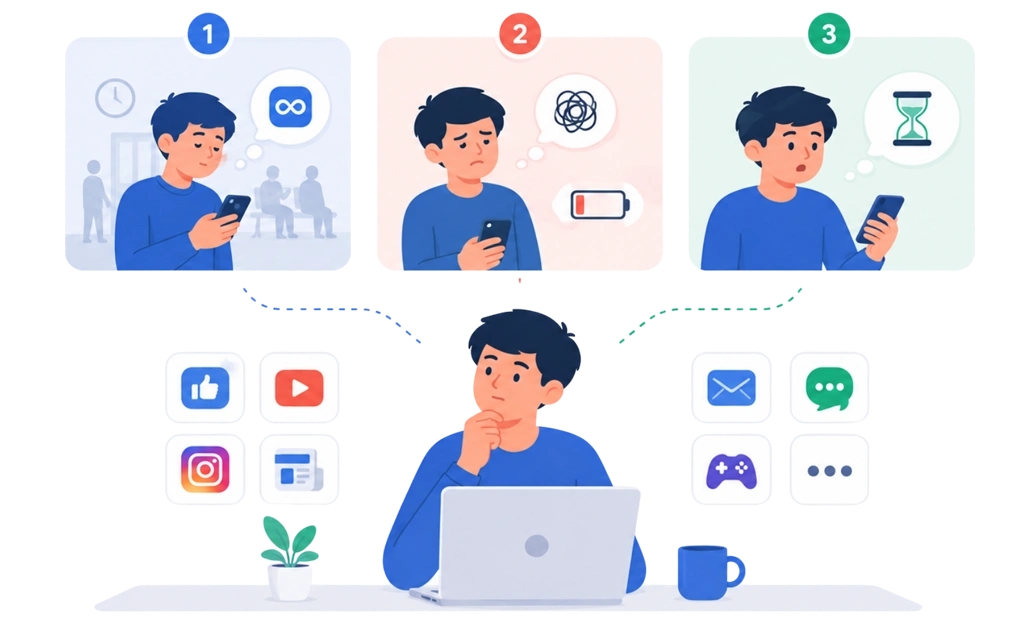
Generic advice like “block social media” sounds tidy, but it may be too broad. Not every app is the villain. Some are just standing nearby wearing a suspicious hat.
Instead of treating every screen as a problem, look for the apps or sites that repeatedly pull you into unplanned use. The three signs below are useful reflection prompts, not a diagnosis.
Three Signs an App May Be Part of the Problem
1. You open it automatically during quiet moments.
Waiting in line. Sitting in a waiting room. Brushing your teeth. If you keep reaching for the same app without a clear reason, it may have become an automatic habit.
That is different from checking a work app because you are waiting for a reply. The context matters. The pattern to notice is opening an app almost before you realize you made the choice.
Difficulty controlling use and continuing despite negative consequences are commonly associated with problematic digital-media use.
2. You often feel worse afterward.
Some screen use leaves you relaxed, informed, or connected. Other sessions may leave you tense, irritated, drained, or wondering why you opened the app in the first place.
Try checking how you feel shortly after closing it. Did the time restore you, or did it quietly steal part of your afternoon and leave crumbs?
Feeling worse after using an app does not prove the app is harmful on its own. However, distress and disruption to everyday life are more meaningful warning signs than screen time alone.
3. You regularly spend longer than intended.
If “two minutes” often becomes thirty, the app may be harder to use intentionally than you expected. That pattern is a sign the app may need a clearer boundary.
Losing track of time can be worth noticing, but it should not be treated as a diagnosis by itself. Research suggests that perceived time distortion may relate to problematic smartphone use, although the relationship is not simple or universal.
Your personal list might include social media, news, video platforms, email, chat tools, games, or anything else that turns into a loop. The category matters less than what happens before, during, and after you use it.
A healthy screen-time balance starts with identifying the habits that interfere with your time, mood, sleep, work, or relationships. You do not need to declare war on every app with an icon.
The Graduated Reduction Approach
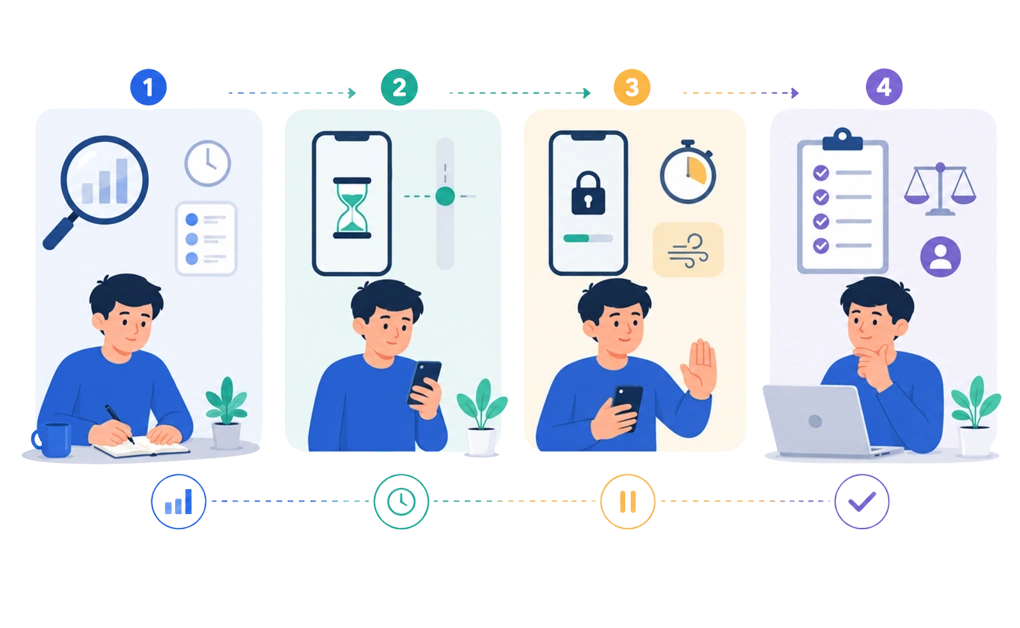
Once you identify the apps or sites that pull you in most, you may not need to block everything at once.
A gradual approach can give you time to notice what works and adjust what does not. The four-week structure below is one option, not a required timetable. This is not military school. It is an experiment with your habits.
Week 1: Observe Without Restricting
Start by tracking how often you use the apps you identified.
Try not to judge the number or rush to change it. Just notice when you open the app, how long you stay, and what usually happens beforehand.
Self-monitoring can help make automatic habits more visible. However, awareness alone may not be enough for everyone, so treat this week as information gathering rather than the whole solution.
Week 2: Try a Soft Limit
Consider setting a limit slightly below your current use.
For example, if one app takes up around three hours a day, you might begin with two and a half. The exact number matters less than choosing a change that feels noticeable but manageable.
The aim is not to “win” the week. It is to see how your routine responds when a boundary appears.
Week 3: Add Gentle Friction
If the first limit feels manageable, you can tighten it slightly or add a small pause before opening the app.
That friction might be a delay, cooldown, breathing prompt, or confirmation screen. Research on digital nudges suggests that even a brief interruption can reduce some automatic app-opening attempts.
This is also where a tool may help. If your main distractions happen on a computer, you can set screen-time limits on your PC instead of relying only on end-of-day willpower, which is famously unreliable and usually wants snacks. If you use Linux and sudden cutoffs feel hard to stick with, there are flexible ways to control screen time on Linux for ADHD users, such as daily allowances and work-break rotation.
Week 4: Choose a Level You Can Maintain
Review what happened during the first three weeks.
You might keep the current limit, tighten it slightly, or loosen it if it interferes with legitimate work, communication, or rest. There is no universal daily number that works for every person or every app.
A useful limit should reduce unplanned use without making your entire routine feel like a punishment system.
A quick note on pace: Four weeks is simply a starting structure. Some people may move faster, while others may need more time. The useful sequence is to observe, test a limit, add friction, and adjust based on what fits your life.
How DigitalZen Can Support Calmer Evenings and Mornings

Daily limits can help, but some people get more value from focusing on the times when scrolling causes the most disruption.
Two common windows to experiment with are:
- The period before sleep.
- The first part of the morning.
These times are not automatically the most important for everyone. They are simply useful starting points if nighttime or morning browsing keeps pulling your day off course.
The Time Before Sleep
Using a phone or computer close to bedtime is associated with later sleep, poorer sleep quality, and less rest for some people.
Your device is not evil. It is just extremely talented at offering one more video when the rest of you is trying to power down.
The issue is not only the screen itself. News, social feeds, messages, and short-form videos can keep you engaged longer than planned.
If your evenings regularly disappear into scrolling, reducing doomscrolling before bed may be a useful place to begin.
DigitalZen can help by:
- Scheduling blocks for distracting websites and desktop apps at your chosen stopping time
- Setting daily allowances so selected sites run out before your evening cutoff
You can start with a lighter Cooldown lock or use a Schedule lock when you want the boundary to hold more firmly. At the chosen time, the tool becomes the responsible adult in the room. Very annoying. Sometimes very useful.
The First Part of the Morning
Reaching for a device immediately after waking can place messages, headlines, and other people’s priorities at the front of your attention.
Some people find that delaying access creates a calmer start. That delay does not need to last a full hour. You might try ten, twenty, or thirty minutes and notice whether it changes how the morning feels.
If you want to experiment with this, a few simple approaches can help:
- Delay checking your device by a set amount of time after waking.
- Use DigitalZen to keep selected websites and desktop apps unavailable until a scheduled start time.
- Enable Focus Mode to allow essential work tools while blocking news, entertainment, and personal browsing.
- Adjust your environment, such as keeping your phone farther from the bed.
Start With the Window That Causes the Most Trouble
Sleep and mornings are common problem areas, but they are not universal.
Your main pattern may happen during an afternoon slump, after work, or on weekends. DigitalZen’s schedules, allowances, and adjustable locks let you target that specific window instead of applying one rigid rule to the entire day.
A healthy screen-time balance should fit your actual routine, not someone else’s perfect morning.
Building a Balance You Can Keep

Screen-time limits can help, but they work better when your environment supports them. You might keep your phone farther from the bed, remove distracting apps from a work device, or take breaks that involve stepping away from a screen. None of these is a requirement. They are small experiments that can make the next good choice a little easier.
It also helps to match the boundary to the situation. A website may be useful during the day and difficult to leave at night. A work app may be necessary on Monday afternoon but unwelcome on Sunday evening. When nighttime use is the main problem, blocking apps at night can create a clearer stopping point than setting the same limit for every hour of the week.
The setup may need to change as your routine changes. Some weeks may call for firmer limits, while others need more flexibility. Adjusting the plan does not mean it failed. It means you noticed what was happening and recalibrated.
A healthy screen-time balance is less about building a perfect restriction system and more about finding where the habit actually lives. The most useful change is usually the one that fits that moment and remains manageable on an ordinary, slightly chaotic day.
Frequently Asked Questions
What Is a Healthy Screen-Time Balance?
A healthy screen-time balance is not defined by one perfect number of hours.
For adults, there is no widely accepted daily limit that fits every situation. The more useful question is whether screen use supports your work, relationships, learning, and rest without regularly interfering with sleep, mood, movement, or responsibilities.
Two people may spend the same number of hours on a device and have very different experiences. The number matters, but the pattern and purpose matter too.
Can a Website and App Blocker Actually Help Reduce Screen Time?
A blocker can help in reducing screen time. It makes unplanned use less automatic. Features like schedules, daily limits, Focus Mode, cooldowns, and adjustable locks add enough friction to interrupt the habit without making everything permanent. On Linux, where the system has no app limits of its own, a blocker is one of the more reliable ways to limit app usage time on Linux across browsers and desktop apps.
DigitalZen follows this approach. You can start with lighter limits, adjust what works, and make them stricter over time. The goal isn’t to block everything, but to build boundaries you can stick to.
Is It Better to Quit Screens Suddenly or Reduce Gradually?
There is not enough evidence to say that gradual reduction works better for everyone.
Abrupt limits may help some people, while others find smaller changes easier to maintain. Research does show that reducing smartphone use can improve sleep, stress, well-being, and depressive symptoms over a few weeks. However, use often rises again after a structured intervention ends, which suggests that long-term routines matter.
A practical approach is to choose a change you can test without turning your digital life into a punishment system.
How Long Does It Take to Notice a Difference?
There is no guaranteed timeline.
Some studies have reported changes after two or three weeks of reduced smartphone or recreational screen use. The results vary by person, starting habits, and the kind of screen use being reduced.
Instead of waiting for one dramatic transformation, look for smaller shifts. You might fall asleep a little earlier, reach for an app less automatically, or feel more present during certain parts of the day.
The useful question is not “Did everything change immediately?” It is “Is the pattern moving in a direction that feels better?”
Can I Set Different Limits for Weekdays and Weekends?
Yes. Different limits may fit better if your weekday and weekend routines are not the same.
You might need tighter boundaries during work hours and more flexibility on weekends. Or you may need the opposite because weekends are when the scroll vortex opens its little trapdoor.
The schedule should match when unplanned use actually happens. It does not need to treat every day as identical.
What If My Screen Use Increases Again After I Make Progress?
That does not mean the whole plan failed.
A stressful week, poor sleep, travel, or a change in routine can affect how often you reach for a device. Research has also found that screen use can rise again after a temporary reduction program ends.
Notice what changed and adjust the setup. You might return to an earlier limit, add a little more friction, or focus on the time of day that became difficult again.
Treat the setback as information. It is not a sign that the whole plan failed. If you have ADHD, slips often follow specific patterns, which our guide on why digital boundaries keep failing with ADHD explains.
References
- https://arxiv.org/abs/2201.00303
- https://pmc.ncbi.nlm.nih.gov/articles/PMC9112639/