

Most website blockers fall short for ADHD because they assume you can resist the urge to disable them. They offer pause buttons, easy overrides, and time-based locks that expire too soon. These features work for people who need a light nudge.
ADHD often calls for stronger guardrails. The issue isn’t a lack of effort; it’s that most tools weren’t designed with ADHD in mind.
Key Takeaways
- Most blockers assume steady impulse control: They rely on you choosing not to disable them, which can be harder for many people with ADHD in the moment.
- Browser extensions are often too easy to disable: A few clicks can remove the block or make it easier to work around.
- System-level blocking is not enough on its own: If overrides are too easy, the blocker can still fall apart in the moment.
- Time-based locks can be a poor fit for ADHD time blindness: The block may expire before you notice how much time has passed.
- ADHD-friendly blockers need friction, not flexibility: Adaptive locks, cooldown timers, and whitelisting work better than easy overrides.
Why Most Website Blockers Fail for ADHD

Most blockers are built around the assumption that users can pause, override, or disable a block and reliably re-enable it later. For many people with ADHD, that assumption does not hold up. When impulse hits, the block needs to stay in place.
1. Browser Extensions Are Too Easy to Disable
Browser extensions live in the toolbar. A few clicks can disable or remove them. Impulsive moments happen fast. They happen faster than the time it takes to think twice.
Even “locked” extensions can be bypassed. You can switch to a different browser. You can open an incognito window. The block only works if you stay inside the rules. ADHD makes that harder.
For a deeper look at extension limitations, why browser extensions are not enough for distraction blocking covers the general case.
2. Pause and Override Buttons Defeat the Purpose
Many blockers include a “pause for 5 minutes” button. Others let you override with a simple click or by typing a phrase. These features assume you can stop yourself in the moment.
For many people with ADHD, impulse control is less reliable in the moment. The pause button becomes the escape hatch. The override becomes the default.
3. Manual Blockers Get Undone
Some blockers rely on manual steps you have to keep enforcing yourself. Editing the hosts file is one example. These methods work until they don’t; a moment of low energy or a sudden urge is all it takes to undo them.
The block only works if you keep choosing to leave it active. For ADHD users, that choice can be inconsistent across a single day. What you set up in the morning may not hold by the afternoon.
4. Time-Based Locks Do Not Account for Time Blindness
Some blockers lock for a set period. Two hours. Four hours. Then they expire automatically. This assumes you notice time passing.
Time blindness is common with ADHD. Hours can feel like minutes. The lock may expire before you notice, and the distraction is available again sooner than you meant it to be.
For a full comparison of available tools, the best website blockers for productivity covers the options in detail.
5. Flexible Blocking Often Backfires for ADHD
Many blockers treat flexibility as a feature. They let you pause for a few minutes, adjust the rules on the fly, or make quick exceptions. That can sound helpful, but it may work against you in the exact moment when you most need the block to hold.
Every extra choice creates another chance to negotiate with the block. A short pause turns into a longer break. A small exception becomes the start of a distraction spiral. In those moments, more flexibility can make it easier to drift away from the original plan.
That does not mean flexibility is always bad. The problem is flexibility at the wrong time. For ADHD, blockers often work better when decisions are made ahead of time and harder to undo in the moment. That is why stronger guardrails can be more helpful than easy overrides.
What ADHD Brains Actually Need From a Blocker
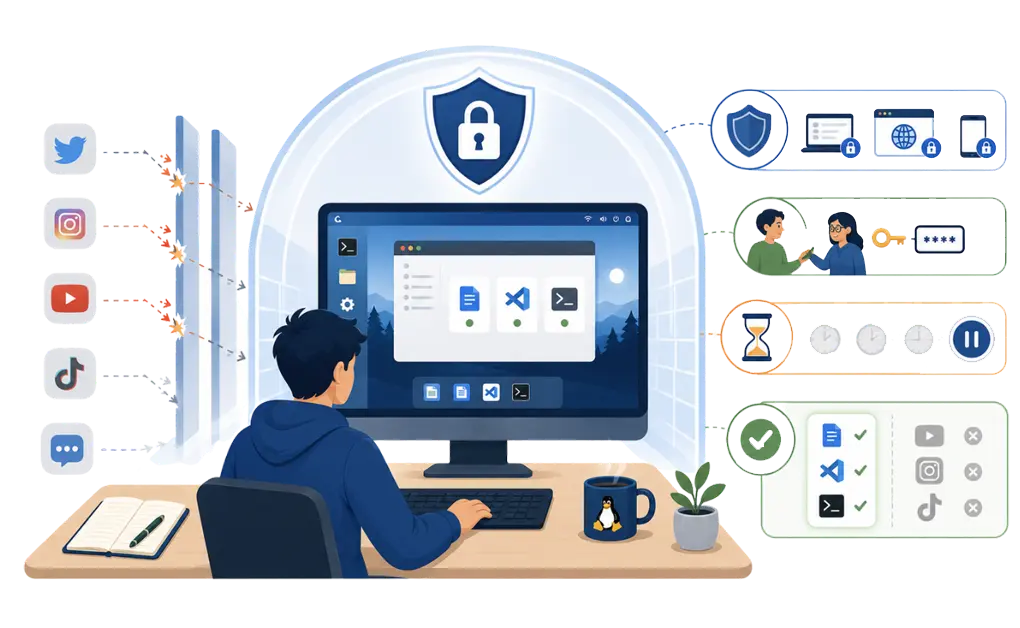
ADHD-friendly blockers work differently. They assume impulse control is unreliable. They add friction instead of flexibility. They make disabling the block harder, not easier.
A Good Blocker Has to Survive the Worst Moment, Not the Best One
A blocker should not be judged only by how it works when motivation is high. It should be judged by what happens when you are bored, restless, frustrated, or looking for an escape.
That is when a weak blocker breaks. If it is easy to disable, easy to pause, or easy to work around, it will not hold when you need it most. The setup has to keep working even when attention dips and the urge to check something feels strong.
That is the real test. A blocker has to do more than support good intentions. It has to hold up in the hardest moments, too.
System-Level Enforcement That Cannot Be Bypassed
Blocks should work at the system level, not just the browser. Switching browsers should not bypass them. Opening incognito should not help. Apps should be blocked too, not just websites.
The block needs to hold even when you want to disable it. That is the point. If you can easily turn it off, it will not work when impulse hits.
Adaptive Locks With External Accountability
Some locks require external action to disable. For example, sending a code to a friend. Someone else holds the key during focus time.
This adds social friction. Disabling the block becomes a deliberate, multi-step process. You have to reach out, explain, and wait. By then, the impulse often passes.
Cooldown Timers That Create Friction
Instead of an instant override, some blockers require a waiting period. Ten minutes. Thirty minutes. The delay interrupts the impulse.
Friction is the point. Not punishment. Protection. By the time the cooldown ends, you often no longer want to disable the block.
Whitelisting Over Blacklisting
Blacklisting blocks specific sites but leaves everything else open. New distractions slip through. You block YouTube, then find yourself on TikTok.
Whitelisting works the other way. It blocks everything except approved work tools. No loopholes. No new distractions sneaking in. You decide what is allowed before you start working.
How DigitalZen Addresses These Needs
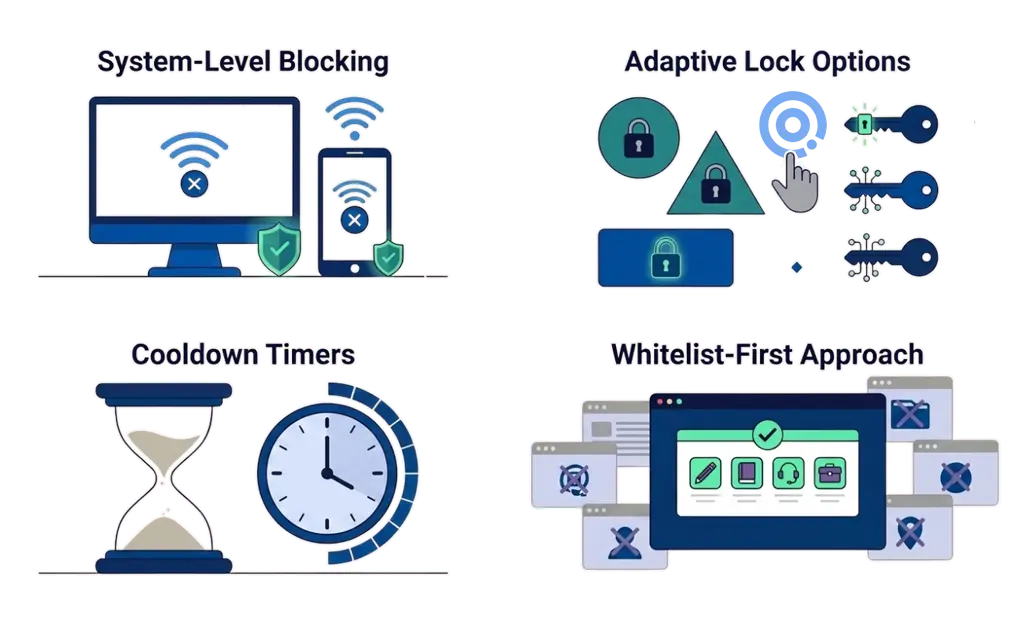
DigitalZen is built with these principles in mind. Instead of relying on you to override your own impulses, it adds friction where it matters most.
-
System-Level Blocking
DigitalZen blocks websites and apps at the system level. It works across browsers. You cannot bypass it by switching to incognito or using a different browser.
-
Adaptive Lock Options
DigitalZen offers multiple lock types with different levels of friction. Some require waiting. Others require external action. The harder it is to disable, the better it works during impulsive moments.
-
Cooldown Timers
Cooldown timers require a waiting period before disabling blocks. This interrupts the impulse cycle. It gives you time to reconsider before the block comes down.
-
Whitelist-First Approach
DigitalZen supports whitelisting. Block everything by default. Allow only the tools you need for work. No loopholes for new distractions.
DigitalZen is designed for ADHD and focus challenges, with features that address the specific ways standard blockers fail.
Finding a Blocker That Works for ADHD
The bottom line: if a blocker has easy overrides, pause buttons, or time-based locks that expire automatically, it probably will not work for ADHD. Look for system-level blocking, adaptive locks, cooldown timers, and whitelisting instead.
Now that you understand why most blockers fail, how to block distractions on Linux for ADHD walks through the setup step by step. Blocking is one piece of a larger system. Building stronger digital boundaries can help support the rest of your setup.
Frequently Asked Questions
Why Do Website Blockers Not Work for ADHD?
Because they assume steady impulse control in the moment. Most blockers offer pause buttons, easy overrides, and time-based locks, features that work for people who only need a light nudge. For many ADHD users, impulse control is less reliable when an urge hits, so these easy escape hatches tend to fail at exactly the wrong time.
What Kind of Blocker Works Best for ADHD?
Blockers that add friction instead of flexibility. Look for system-level blocking, adaptive locks, cooldown timers, and whitelisting. These features make disabling the block harder during impulsive moments.
Are Browser Extensions Good Enough for ADHD?
Usually not. Browser extensions are easy to disable with a few clicks. They can also be bypassed by switching browsers or using incognito mode. System-level blockers are more reliable.
What Is the Difference Between Blacklisting and Whitelisting?
Blacklisting blocks specific sites but leaves everything else open. Whitelisting blocks everything except approved tools. Whitelisting works better for ADHD because it closes loopholes before they become problems.
What Is the 10-3 Rule for ADHD?
The 10-3 rule is a time management strategy. You work for 10 minutes, then take a 3-minute break. The short intervals make it easier to start tasks and maintain focus. It works by lowering the mental barrier to starting and providing frequent breaks that support attention and motivation.
Can I Still Access Work Tools While Blocking Distractions?
Yes. ADHD-friendly blockers let you whitelist the tools you need for work. Everything else stays blocked. This keeps you productive without making your computer unusable.